Product Use Cases Demo Resources Blog Company Contact
Documentation Edit Entity Model
  • Installation Instructions
    • Installation using the Installer
    • Installation of a Software Release
      • Installation of the Distribution
        • Installation from a Distribution version 4.4+ (on Unix)
        • Installation from a Distribution version 4.3+ (on Unix)
        • Installation from a Distribution version 4.3+ (on Windows)
        • Installation from a Distribution version 4.0+ (on Unix)
        • Installation from a Distribution version 3.6 or earlier (on Unix)
        • Installation of a Distribution
      • Installation of the Postgres Database (no longer used in 4.3.0 or newer)
  • Upgrade Instructions
    • Upgrading from 4.4.x to 4.4.y
    • Upgrading from 4.3.x to 4.4.y
    • Upgrading from 4.3.x to 4.3.y
    • Upgrading from 4.2.x to 4.3.y
    • Upgrading from 4.2.x to 4.2.y
    • Upgrading from 4.1.x to 4.2.0
    • Upgrading from 4.1.x to 4.1.y
    • Upgrading from 4.0.x to 4.1.y
    • Upgrading from 4.0.x to 4.0.y
    • Upgrading from 3.5.x to 4.0.0
    • Upgrading from 3.5.x to 3.6.0
  • Administrative Console
    • Login
    • Overview
    • File
      • Flexible Data Loader
    • Edit
      • Add Person
      • Update Person
      • Delete Person
      • Profile
      • Edit Identifier Domains
      • Edit Entity Model
        • Add Entity
        • Edit Entity
        • Import Entity
        • Export Entity
        • Remove Entity
        • Export Records
    • Search
      • Basic Search
      • Advanced Search
    • Security
      • Manage Roles
      • Manage Users
    • Administration
      • Advanced Features
        • Assign Global Identifiers
        • Initialize Links
        • Rebuild Blocking Indexes
        • Regenerate Custom Fields
        • Regenerate Links
      • Blocking Configuration
      • Custom Field Configuration
      • Data Profile
      • Event Notification
      • Event Viewer
      • Manage Identifier Domains
      • Manage Report Design
      • Matching Configuration
      • Report Generator
        • Installation of Reporting Module
      • Review Links
      • Start PIX/PDQ Server
      • Stop PIX/PDQ Server
  • Administrative Console (New in 4.0.0)
    • Login Page
    • Home Page
    • Search Page
    • User Files Page
    • Entities Page
    • Identifier Domains Page
    • Custom Fields Page
    • Blocking Page
    • Matching Page
      • Adaptive Matching Algorithm
    • Security Pages
      • Roles Page
      • Users Page
    • Audit Logs Page
    • Data Profiles Page
    • Reports Manager Page
      • Generate Reports Page
      • View Reports Page
    • Administration Page
      • Job Queue Page
      • Operations Page
      • Settings Page
  • RESTful Interface Design for Entity Version
    • Entity API Documentation
      • Entity Domain Resource
      • Identifier Domain Resource
      • Notification Resource
      • Record Domain Resource
      • Record Link Domain Resource
      • String Comparator Resource
      • Synonym Resource
  • RESTful Web Services Interface (legacy API)
    • Person Manager Resource Documentation
      • addIdentifierDomain
      • addIdentifierDomainAttribute
      • addPerson
      • addReviewRecordPair
      • deleteIdentifierDomain
      • deletePerson
      • deletePersonById
      • deleteReviewRecordPair
      • deleteReviewRecordPairs
      • importPerson
      • linkPersons
      • matchReviewRecordPair
      • mergePersons
      • removeIdentifierDomainAttribute
      • removePersonById
      • unlinkPersons
      • updateIdentifierDomain
      • updateIdentifierDomainAttribute
      • updatePerson
      • updatePersonById
    • Person Query Resource Documentation
      • findGenderByCode
      • findGenderByName
      • findIdentifierDomain
      • findLinkedPersons
      • findMatchingPersonsByAttributes
      • findPersonById
      • findPersonsByAttributes
      • findPersonsByAttributesPaged
      • findPersonsById
      • findRaceByCode
      • findRaceByName
      • getGlobalIdentifierById
      • getIdentifierDomainAttribute
      • getIdentifierDomainAttributes
      • getIdentifierDomains
      • getIdentifierDomainTypeCodes
      • getPersonLinks
      • getPersonModelAllAttributeNames
      • getPersonModelAttributeNames
      • getPersonModelCustomAttributeNames
      • getSingleBestRecord
      • getSingleBestRecords
      • loadAllPersonsPaged
      • loadAllUnreviewedPersonLinks
      • loadPerson
      • loadUnreviewedPersonLinks
      • loadReviewRecordPair
      • loadPersons
    • RESTClient tool
    • WADL for Person Manager Resource
    • WADL for Person Query Service
  • IHE PIX/PDQ Testing for OpenEMPI
    • Overview of the PIX/PDQ Profiles
    • PIX/PDQ HL7v3 Requirements Overview
      • PIXv3 Add/Update/Merge
      • PIX v3 Query
      • PIX Update Notification
      • Patient Demographics Query HL7 v3
    • Test Cases for Compliance with PIX and PDQ HL7v2 Profiles
      • Feed Check PID Test
      • Feed Unknown Domain Test
      • Feed Valid Domain Test
      • Merge Patient
      • Query Case 1: Data Found
      • Query Case 2: Data Not Found
      • Query Case 3, 4, 5, 6
      • Update and Link
      • Update Check PID
      • Update Unknown Domain
      • Update Valid Domain Patient Exist
      • PDQ Query Case1: Data Found Exact Match Single Domain
      • PDQ Query Case1: Data Found Single Domain
      • PDQ Query Case2: Data Found Exact Match Single Domain
      • PDQ Query Case2: Data Found Single Domain
      • PDQ Query Case3
    • PIX/PDQ Message Tool
    • Patient Master Identity Registry
  • Identifier Change Notification
    • Use Cases
    • Examples
    • Configuration
  • System Maintenance
    • Advanced Security Configuration
      • Encoding Configuration Properties
      • Use LDAP for Authentication
    • Backups
    • Changing Database Passwords
    • Clearing the Audit Logs Automatically
    • Collecting Performance Metrics
    • Exporting Data
    • Running OrientDB in Distributed Mode
    • Running OrientDB in Server Mode
    • Setting up the Notification Service
      • Setting up Notifications Using Apache ActiveMQ
      • Setting up Notifications Using RabbitMQ
    • Starting and Stopping OpenEMPI
    • Using Oracle as the Relational Database
    • Using the Synonym Service
    • Using Memorized Classification Decisions
    • Reviewing Audit Information
  • Release Notes
  • Release Notes (Retired)
  • Load Testing
    • Load Testing of 4.4 Release
    • Load Testing of 3.6 Release
    • Load Testing of 3.3 Release

Additional guides

  • Installation of the OrientDB Database
  • Installation on Unix/Linux
  • Installation on Unix/Linux (Tomcat 8)
  • Installation of Legacy Distribution Format
Documentation overview
  • Installation Instructions
    • Installation using the Installer
    • Installation of a Software Release
      • Installation of the Distribution
        • Installation from a Distribution version 4.4+ (on Unix)
        • Installation from a Distribution version 4.3+ (on Unix)
        • Installation from a Distribution version 4.3+ (on Windows)
        • Installation from a Distribution version 4.0+ (on Unix)
        • Installation from a Distribution version 3.6 or earlier (on Unix)
        • Installation of a Distribution
      • Installation of the Postgres Database (no longer used in 4.3.0 or newer)
  • Upgrade Instructions
    • Upgrading from 4.4.x to 4.4.y
    • Upgrading from 4.3.x to 4.4.y
    • Upgrading from 4.3.x to 4.3.y
    • Upgrading from 4.2.x to 4.3.y
    • Upgrading from 4.2.x to 4.2.y
    • Upgrading from 4.1.x to 4.2.0
    • Upgrading from 4.1.x to 4.1.y
    • Upgrading from 4.0.x to 4.1.y
    • Upgrading from 4.0.x to 4.0.y
    • Upgrading from 3.5.x to 4.0.0
    • Upgrading from 3.5.x to 3.6.0
  • Administrative Console
    • Login
    • Overview
    • File
      • Flexible Data Loader
    • Edit
      • Add Person
      • Update Person
      • Delete Person
      • Profile
      • Edit Identifier Domains
      • Edit Entity Model
        • Add Entity
        • Edit Entity
        • Import Entity
        • Export Entity
        • Remove Entity
        • Export Records
    • Search
      • Basic Search
      • Advanced Search
    • Security
      • Manage Roles
      • Manage Users
    • Administration
      • Advanced Features
        • Assign Global Identifiers
        • Initialize Links
        • Rebuild Blocking Indexes
        • Regenerate Custom Fields
        • Regenerate Links
      • Blocking Configuration
      • Custom Field Configuration
      • Data Profile
      • Event Notification
      • Event Viewer
      • Manage Identifier Domains
      • Manage Report Design
      • Matching Configuration
      • Report Generator
        • Installation of Reporting Module
      • Review Links
      • Start PIX/PDQ Server
      • Stop PIX/PDQ Server
  • Administrative Console (New in 4.0.0)
    • Login Page
    • Home Page
    • Search Page
    • User Files Page
    • Entities Page
    • Identifier Domains Page
    • Custom Fields Page
    • Blocking Page
    • Matching Page
      • Adaptive Matching Algorithm
    • Security Pages
      • Roles Page
      • Users Page
    • Audit Logs Page
    • Data Profiles Page
    • Reports Manager Page
      • Generate Reports Page
      • View Reports Page
    • Administration Page
      • Job Queue Page
      • Operations Page
      • Settings Page
  • RESTful Interface Design for Entity Version
    • Entity API Documentation
      • Entity Domain Resource
      • Identifier Domain Resource
      • Notification Resource
      • Record Domain Resource
      • Record Link Domain Resource
      • String Comparator Resource
      • Synonym Resource
  • RESTful Web Services Interface (legacy API)
    • Person Manager Resource Documentation
      • addIdentifierDomain
      • addIdentifierDomainAttribute
      • addPerson
      • addReviewRecordPair
      • deleteIdentifierDomain
      • deletePerson
      • deletePersonById
      • deleteReviewRecordPair
      • deleteReviewRecordPairs
      • importPerson
      • linkPersons
      • matchReviewRecordPair
      • mergePersons
      • removeIdentifierDomainAttribute
      • removePersonById
      • unlinkPersons
      • updateIdentifierDomain
      • updateIdentifierDomainAttribute
      • updatePerson
      • updatePersonById
    • Person Query Resource Documentation
      • findGenderByCode
      • findGenderByName
      • findIdentifierDomain
      • findLinkedPersons
      • findMatchingPersonsByAttributes
      • findPersonById
      • findPersonsByAttributes
      • findPersonsByAttributesPaged
      • findPersonsById
      • findRaceByCode
      • findRaceByName
      • getGlobalIdentifierById
      • getIdentifierDomainAttribute
      • getIdentifierDomainAttributes
      • getIdentifierDomains
      • getIdentifierDomainTypeCodes
      • getPersonLinks
      • getPersonModelAllAttributeNames
      • getPersonModelAttributeNames
      • getPersonModelCustomAttributeNames
      • getSingleBestRecord
      • getSingleBestRecords
      • loadAllPersonsPaged
      • loadAllUnreviewedPersonLinks
      • loadPerson
      • loadUnreviewedPersonLinks
      • loadReviewRecordPair
      • loadPersons
    • RESTClient tool
    • WADL for Person Manager Resource
    • WADL for Person Query Service
  • IHE PIX/PDQ Testing for OpenEMPI
    • Overview of the PIX/PDQ Profiles
    • PIX/PDQ HL7v3 Requirements Overview
      • PIXv3 Add/Update/Merge
      • PIX v3 Query
      • PIX Update Notification
      • Patient Demographics Query HL7 v3
    • Test Cases for Compliance with PIX and PDQ HL7v2 Profiles
      • Feed Check PID Test
      • Feed Unknown Domain Test
      • Feed Valid Domain Test
      • Merge Patient
      • Query Case 1: Data Found
      • Query Case 2: Data Not Found
      • Query Case 3, 4, 5, 6
      • Update and Link
      • Update Check PID
      • Update Unknown Domain
      • Update Valid Domain Patient Exist
      • PDQ Query Case1: Data Found Exact Match Single Domain
      • PDQ Query Case1: Data Found Single Domain
      • PDQ Query Case2: Data Found Exact Match Single Domain
      • PDQ Query Case2: Data Found Single Domain
      • PDQ Query Case3
    • PIX/PDQ Message Tool
    • Patient Master Identity Registry
  • Identifier Change Notification
    • Use Cases
    • Examples
    • Configuration
  • System Maintenance
    • Advanced Security Configuration
      • Encoding Configuration Properties
      • Use LDAP for Authentication
    • Backups
    • Changing Database Passwords
    • Clearing the Audit Logs Automatically
    • Collecting Performance Metrics
    • Exporting Data
    • Running OrientDB in Distributed Mode
    • Running OrientDB in Server Mode
    • Setting up the Notification Service
      • Setting up Notifications Using Apache ActiveMQ
      • Setting up Notifications Using RabbitMQ
    • Starting and Stopping OpenEMPI
    • Using Oracle as the Relational Database
    • Using the Synonym Service
    • Using Memorized Classification Decisions
    • Reviewing Audit Information
  • Release Notes
  • Release Notes (Retired)
  • Load Testing
    • Load Testing of 4.4 Release
    • Load Testing of 3.6 Release
    • Load Testing of 3.3 Release

Additional guides

  • Installation of the OrientDB Database
  • Installation on Unix/Linux
  • Installation on Unix/Linux (Tomcat 8)
  • Installation of Legacy Distribution Format
Resources Documentation Administrative Console Edit
Administrative Console

Edit Entity Model

1 min read · 6 subsections

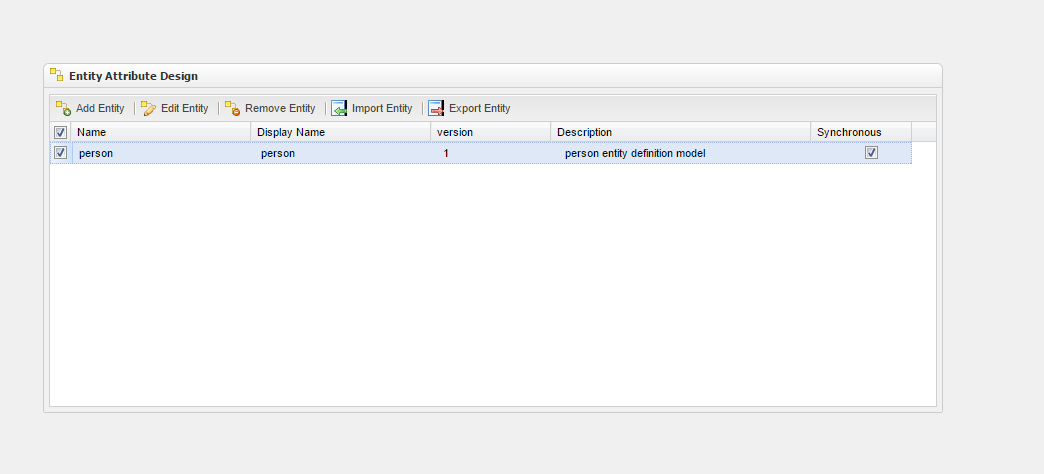
Users are able to use the Edit Entity Model feature to add and modify entity models. To access this resource, select the Edit > Edit Entity Model option. The Entity Attribute Design module will appear on the screen as you can see in the following images.
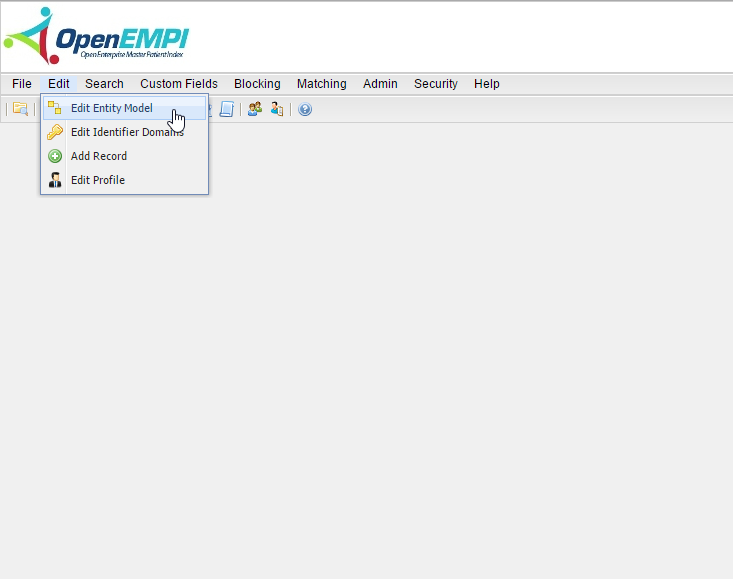
Edit Entity Model screenshot

Edit Entity Model screenshot

The Entity Attribute Design module allows you to perform the following operations:

  • Add Entity
  • Edit Entity
  • Import Entity
  • Export Entity
  • Remove Entity
  • Export Records

In this section

  • Add Entity To add an entity, simply select Add Entity. The Entity Design page will appear, as shown below:
  • Edit Entity To use the Edit Entity feature, click Edit Entity. The Entity Design page will appear, as shown below.
  • Import Entity The Import Entity functionality allows you to import an entity definition that was created on another instance of…
  • Export Entity The Export Entity functionality allows you to export an entity definition so that it can be imported onto another…
  • Remove Entity In order to remove an entity, you must select the Remove Entity button. After selecting it, the Entity Design module…
  • Export Records The Export Records feature allows you to export the data that has been loaded onto an instance of OpenEMPI for further…
Previous Edit Identifier Domains Next Add Entity

Up to Edit

Enterprise record deduplication and entity resolution for any domain.

Product

  • Features
  • Use Cases
  • Demo
  • Resources

Company

  • About Us
  • Blog
  • Contact

Legal

  • Privacy Policy
  • Terms of Use
  • Cookie Policy
  • Accessibility

© 2026 Sysnet International Inc. All rights reserved.

RSS Feed